Google recently introduced a branded queries filter in Search Console, a powerful new tool that allows website owners and SEO professionals to gain deeper insights into search traffic. This filter helps differentiate between branded and non-branded queries, giving a clearer picture of how both existing and new users are finding your content. By leveraging this feature, you can optimize your SEO strategy, track brand recognition, and make data-driven decisions to grow your online presence.
What Are Branded Queries?
A branded query is any search that includes your brand name, variations, common misspellings, or products and services directly associated with your brand. For example:
- Brand name: “Google”
- Misspellings: “Gogle”
- Products or services: “Gmail”
On the other hand, non-branded queries are searches where users discover your content without explicitly looking for your brand. These queries are essential for tracking organic growth and understanding how new audiences interact with your website.
Differentiating between branded and non-branded traffic allows you to identify which users are already familiar with your brand and which are discovering your content for the first time. Branded traffic typically results in higher click-through rates and better ranking pages, while non-branded traffic reflects opportunities for expanding your reach and acquiring new users.
How the Branded Queries Filter in Search Console Works
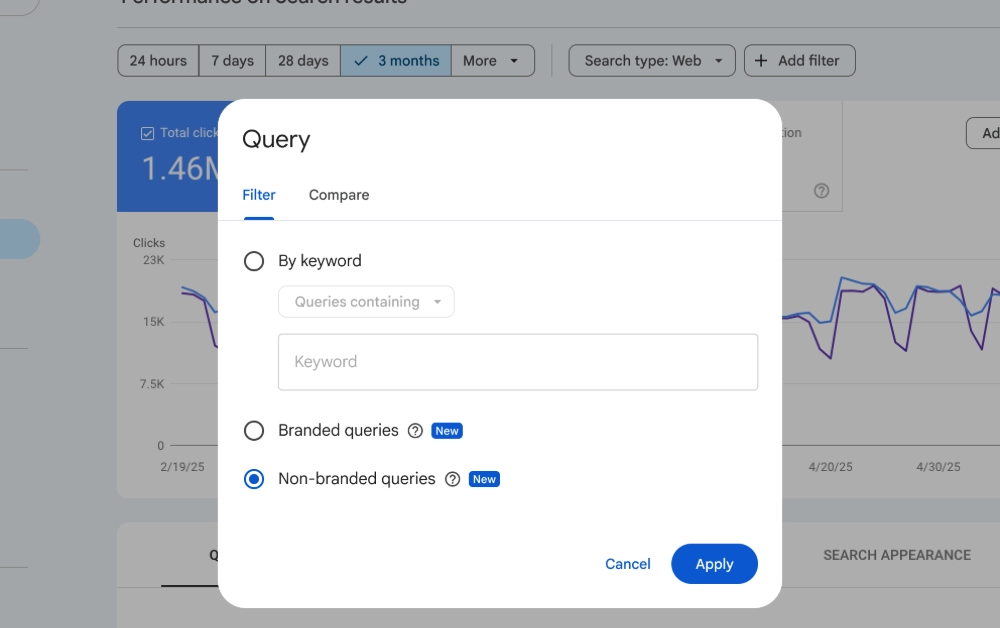
The branded queries filter in Search Console is accessible in the Performance Report. With this filter, you can segment your search traffic into two distinct categories:
- Branded: Queries containing your brand name or closely related products.
- Non-branded: All other queries.
Once applied, the filter shows important metrics such as clicks, impressions, average position, and click-through rate (CTR) specifically for each segment. It works across all search types, including web, image, video, and news, providing a complete view of your site’s performance.
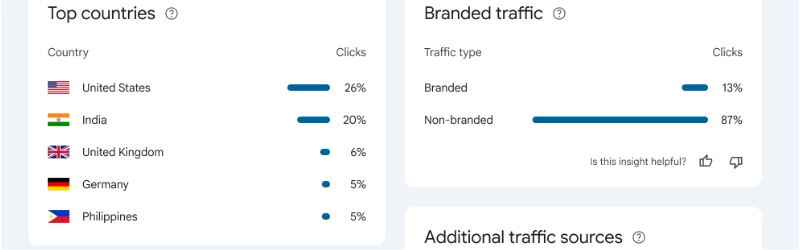
In addition, the new branded traffic card in Search Console Insights provides a visual breakdown of clicks from branded and non-branded queries. This makes it easy to measure brand recognition and compare traffic from users familiar with your brand versus those discovering it organically.
How Branded Queries Are Identified
Google uses an AI-assisted system to classify queries rather than relying on simple keyword matching or regular expressions. The system considers:
- Brand names in all languages
- Common typos and variations
- Queries referring to specific products or services
While occasional misclassifications can occur, the filter is designed purely for analytical purposes and does not affect Google Search rankings.
Who Can Use This Feature?
The branded queries filter in Search Console is rolling out gradually and is available for:
- Top-level properties (not subdomains or URL-path properties)
- Sites with sufficient query volume and impressions
If you do not see the option yet, it may be due to gradual rollout or property type limitations.
Why the Branded Queries Filter Matters for SEO
This feature is invaluable for website owners and digital marketers because it allows you to:
- Measure brand awareness and recognition
- Track organic growth from non-branded queries
- Compare traffic from users already familiar with your brand to new users
- Make data-driven SEO and marketing decisions based on accurate insights
By understanding how your audience interacts with your brand and content, you can refine your content strategy, improve organic reach, and maximize the ROI of your marketing efforts.
Conclusion
The branded queries filter in Search Console is a game-changing tool for anyone looking to gain deeper insights into search performance. By separating branded and non-branded queries, you can better understand your audience, optimize your SEO strategy, and make informed decisions to grow your website organically. Whether you want to measure brand recognition, track organic growth, or analyze traffic patterns, this filter provides a clear and accurate way to segment your data. Make sure to explore this feature in your Performance Report and take advantage of the insights it offers to elevate your SEO efforts.