Staying informed has never been easier, thanks to the personalized content experiences that platforms like Google offer. One standout feature is Google Discover, known for delivering articles, news, and updates tailored to your interests—without needing to search. Now, this mobile-first feature is expanding its reach.
With Google Discover on desktop, users are starting to receive the same intelligent content recommendations directly on their larger screens. It brings more convenience, greater consistency across devices, and curated content that fits your habits, all without lifting a finger to search.
What is Google Discover?
Google Discover is a content recommendation feed developed by Google. Unlike traditional search, where you actively look for something, Discover shows you updates based on your interests, habits, and browsing behavior. It’s available as a swipeable feed on Android devices and inside the Google app on iPhones, and now, it’s gradually being made available to desktop users as well.
This feed isn’t static. It learns over time what kind of articles you read, which topics you follow, and which videos you watch. Using machine learning and user engagement signals, Discover updates constantly to keep your feed relevant and timely. It acts as a personalized content feed rather than a search engine, presenting stories and updates before you even think to ask.
Google Discover on Desktop Now Available in These Countries
As of May 2025, Google Discover on desktop is officially rolling out to users in a handful of countries. This marks a major step forward in Google’s effort to unify the Discover experience across devices.
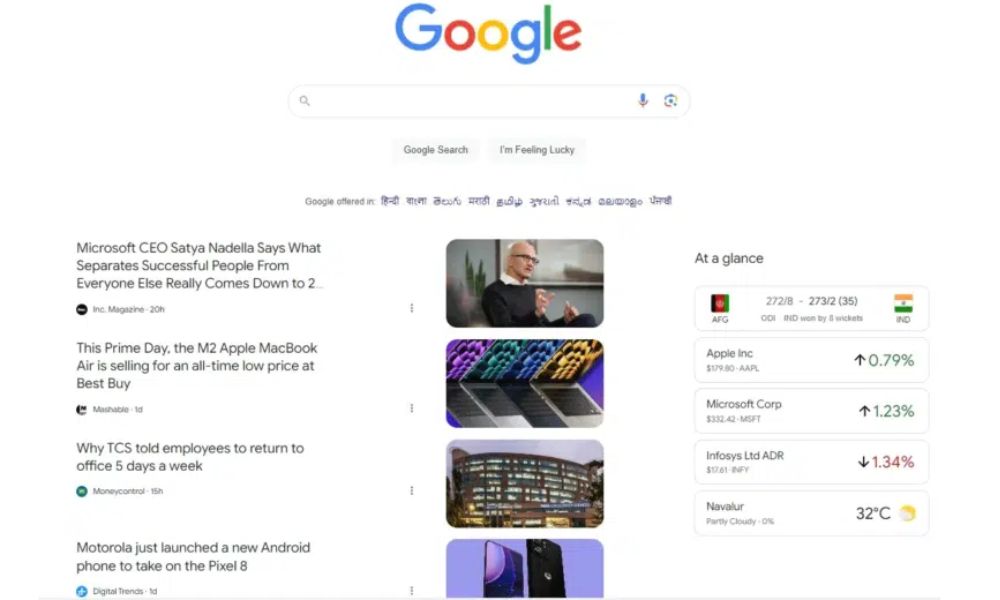
Currently, users in the following countries may already see their personalized Discover feed when visiting google.com on a desktop browser while signed into their Google account:
- Australia
- New Zealand
- United States
- Canada
- United Kingdom
- Germany
In these regions, the Discover feed appears directly below the search bar and includes a curated mix of articles, videos, news, and other personalized content. It uses the same machine learning signals from your mobile usage to provide a consistent content experience across platforms.
Along with the main feed, users may also notice an “At a glance” section offering quick updates like weather, sports scores, or stock performance—all tailored to their interests.
This rollout gives users the benefit of seamless personalization, while also opening up new opportunities for publishers to reach wider desktop audiences through the Google Discover feed.
Key Features You’ll Notice on Desktop
Once you encounter Google Discover on desktop, it becomes part of your everyday browsing. Some standout features include:
- Card-Based Layout: Each piece of content shows up in a card with a headline, image, and brief summary.
- Multimedia Content: Expect more than just news—Discover feeds can include YouTube suggestions, product reviews, industry reports, and even short videos.
- Interaction Options: You can click on the three-dot icon on any card to mark content as relevant, block it, or follow certain topics for more updates.
This setup mirrors the simplicity of the mobile Discover tab while making it useful for longer and more focused reading sessions on desktop. It enhances your interaction with Google Discover feed content, bringing familiar functionality to a new environment.
How Do I Get Google Discover on My Home Screen?
On Android, swipe right from the main home screen or enable Discover in Home Settings.
On iPhone, use the Google app to view Discover.
On PC, open Chrome, visit google.com, and sign in—if available in your region, the Discover feed appears below the search bar.
What Makes Discover Useful for Everyday Browsing
One of the biggest advantages of Google Discover is how it brings content to you—without needing to search. Whether it’s breaking news, sports scores, blog posts, or tech updates, your feed is tailored to your preferences and interests.
It’s especially handy when you just want a quick update during a break or before getting back to work. Instead of jumping between apps or websites, your Discover content feed acts like a personal briefing page, collecting everything that matters most to you.
What’s even better is how it syncs across your devices. You can read something on your phone and later see similar topics on your desktop—without needing to remember what to search for. It’s a consistent and connected way to stay informed throughout your day.
What Publishers and Marketers Should Know
For publishers and SEO professionals, Google Discover on desktop represents a new channel for visibility. Unlike traditional search, Discover prioritizes freshness, user interest, and engagement rather than just keyword relevance.
If your content gets picked up, it can generate huge traffic spikes—even without a search query involved. But to take advantage of this, your content needs to meet several conditions:
- Be high quality and engaging
- Include clear headlines and original images
- Load fast and perform well on all devices
This shift is also encouraging creators to focus on interest-based SEO, where content is optimized around user behavior and engagement signals—not just search engine rankings. Articles that resonate emotionally, address trending topics, or include expert insights tend to perform better in this space.
How to Optimize for Google Discover
If you want your content to appear in the Discover tab, focus on these core strategies:
- Create newsworthy and relevant content that addresses timely questions, trends, or current events.
- Use compelling visuals with descriptive file names and alt text. Discover favors large, high-quality images.
- Write natural, curiosity-driven headlines that make the user want to click without misleading them.
- Make sure your site is technically sound—this includes mobile-friendliness, HTTPS, and fast loading speeds.
- Avoid clickbait or misleading titles, as these can reduce your trust signals over time.
Also, stay consistent with publishing. Regular updates to your site help signal activity and encourage more inclusion in Google Discover feed updates.
How to Measure Your Success in Discover
To see how your content is performing, go to Google Search Console and check the Discover tab (if it’s available to you). There, you’ll find metrics such as:
- Impressions: How many times your content appeared in Discover
- Clicks: How many users interacted with your cards
- CTR: The ratio of clicks to impressions
- Top-performing pages: Content that appears most often
This data can help you refine your strategy, identify strong content formats, and replicate success on future posts.
Conclusion
The introduction of Google Discover on desktop is more than just a UI update. It reflects Google’s shift toward personalized, interest-driven browsing that spans all devices. For users, it’s a better way to stay informed. For publishers, it’s a growing opportunity to reach audiences without relying solely on traditional search.
If you create useful, engaging content and understand what your audience wants, there’s a strong chance that your work will appear in this new content stream. Whether you’re a casual browser or a digital strategist, Discover on desktop is a feature you’ll want to pay attention to.
Frequently Asked Questions
Q1: Can I get Google Discover on PC?
Yes. Just open Chrome, go to the Google homepage, and sign in. If supported in your region, the Discover feed will show up below the search box.
Q2: Can I customize what I see in Discover?
Yes, you can follow topics, block publishers, or adjust content using the menu on each card.
Q3: Why don’t I see Discover yet?
It may not be available in your region, or your account might not be part of the current rollout. Keep Chrome updated and stay logged in.
Q4: How is this different from Google News?
Google News focuses on newsworthy content from trusted publishers. Discover includes broader interest-based content like blogs, opinion pieces, trending topics, and not just news.