On the question of whether I can delete an email sent and prevent it from reaching a recipient’s inbox, a set of options here can help you.
For most e-mail users, one question that is weighing heavily in their minds will be, can you delete an email you sent? This is because it is often a common mistake to press the send button inadvertently, and the mail goes out, and a panic grips the user on how to retrace or delete it.
Fortunately, major email platforms like Gmail and Outlook now offer features to help users retract or undo a sent message. These options help avoid confusion, miscommunication, or embarrassment when emails go out in error.
Can You Delete An Email You Sent? A Clear Explanation
Yes, you can, but only in specific cases and timeframes. The ability to delete or recall a sent email depends on your email provider and whether the message has already been delivered to the recipient’s inbox.
Gmail’s “Undo Send” and Outlook’s “Recall Email” features give users a chance to stop an email before it fully reaches the other person. This article explains exactly how those features work and what limitations apply.
How To Delete Or Recall A Sent Email
In case you use the option to delete an email from the sent folder in Gmail, it will remove the mail from your mailbox, but the mail will still remain in the recipient’s inbox.
That is where the “Undo Send” feature is most useful, as it recalls a message within a short timeframe.
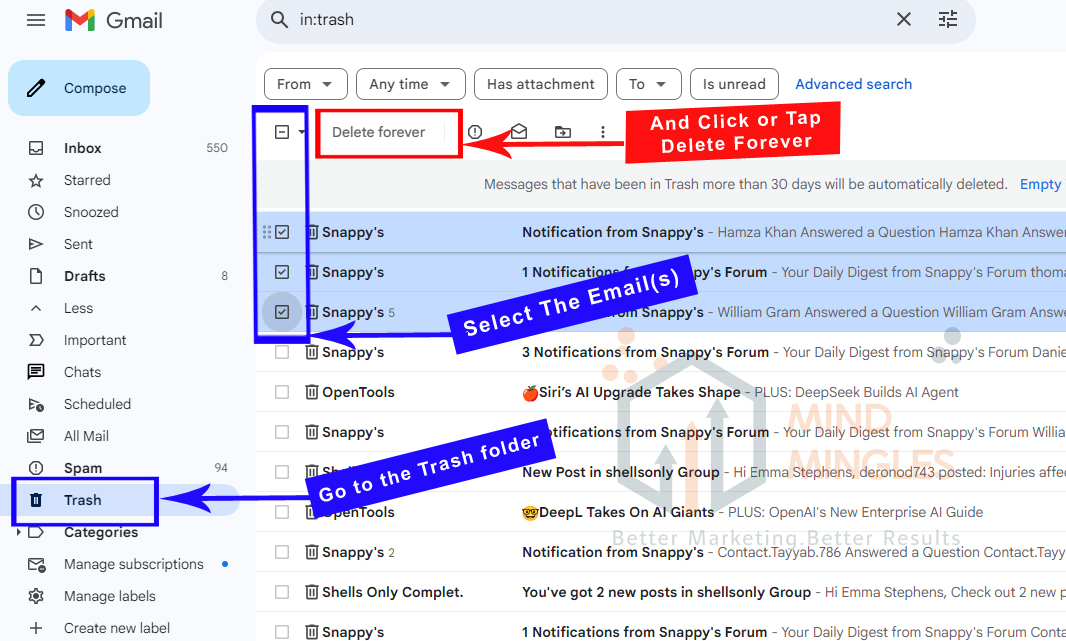
To permanently delete the email,
- Go to the Trash folder
- Select the email(s),
- And click or tap Delete Forever.
Some of the scenarios forcing users to withdraw or delete a sent email are the concern about the email being ridden with typos or wrong information or sending the email to the wrong recipient. It can also be pressing the send button in a hurry or in the heat of the moment, like in an angry mood.
The urgency can also emanate from attaching the wrong file or forgetting to attach the relevant document, which may be time-sensitive information. Or it can be a change of mind about sending an email at all.
Difference Between Recalling And Deleting An Email
The process of removing or deleting an email from the set box is different from recalling it from the Inbox. Recalling an email is all about pulling back the mail before it reaches the recipient’s inbox.
Gmail: Gmail has a user-friendly mechanism to undo sending emails within a range of different time limits, ranging from 5 seconds to 30 seconds.
Technically, it works by delaying the email by holding on to it for a few seconds before sending it out. That gives the user time to unsend the email.
By default, Gmail’s undo email feature is meant for 5 seconds, but it can be stretched to a maximum of 30 seconds by tweaking the Gmail settings. The pop-up at the bottom left offers options to view and undo the message.
It is as simple as making a click to undo and recall the email that will fall into the drafts section. Here, a quick decision is required as the time frame is fractional. That finally solves the riddle: Will Gmail help me delete an email sent?
Gmail: How the “Undo Send” Feature Works
Currently, the facility of recalling email before it hits the recipient’s inbox is offered by both Gmail and Outlook. Their vast user base feels secure as it saves them from any embarrassment or miscommunication.
E-mail Recall Facility in Gmail: As mentioned, Gmail has a feature to recall emails named “Undo Send.” It works to unsend an email within a specific time frame after hitting the send button.
Seconds after hitting the Send button in Gmail, the Undo button at the bottom left of the screen flashes with a message stating, Message Sent.
This allows the user to press the Undo button within 5-30 seconds. The time available for undoing a message can be managed by adjusting the settings to recall the email. To manage the time to recall an email, just tweak the “Undo Send option.
Once a suitable time interval from the drop-down menu is chosen, click Save Changes. If there is any two-step verification for the Gmail account, the user will be asked to enter a code before finishing the email recalling setting in Gmail.
How does Email recall work in Outlook?
In Outlook, there is a feature called Recall Email.
- To operate it, open the Outlook inbox and the sent folder.
- Double-click on the email to unsend it and open it in a new window.
- Then select the actions from the menu bar and click on the Message tab.
- Choose Recall Message from the menu.
- Click OK to confirm the choice.
- Just in case the recipient has read the email, a notification will be coming stating that the Outlook email recall has been unsuccessful.
Although the send feature is prominent in both Outlook and Gmail, it will work effectively only when the recipient uses the same email client. If the sender and user have the same email clients, it might work well, but if they are different, the recall mechanism’s success is not guaranteed.
Other email clients offering features to unsend emails also include Zoho Mail, Mailbird, and the Mail app on various Apple devices.
However, do note that e-mail clients like Yahoo Mail are still without the “unsend” feature.
What makes e-mail recall work better?
Another condition to work for the unsend feature with Gmail or Outlook is that both sender and recipient must be on the same server network. When these conditions are not met, the email may be delivered despite the unsent action.
So, remember the basic quick steps to retract an outgoing email in Outlook are like this.
- Go to the Sent Items.
- Double-click the concerned email.
- Select Actions
- Click the Recall This Message option.
- Select, delete unread copies, or replace messages
Conclusion
To conclude, as technology is evolving, the worry around can you delete an email you sent is becoming less of a concern. Today, you can send emails without the tension of retracing or deleting a sent message altogether. The email recall and Undo Send mechanisms offered by Outlook and Gmail are helpful solutions. They not only reduce the chances of errors and embarrassment but also point toward even more advanced features coming in the future.