It is easy to manage online tools, but recurring payments can make chaotic scenario after a short period. To save money, use an alternative resource or to take break from AI usage, nowadays many users should know how to cancel ChatGPT subscription. The procedure depends on the platforms like the OpenAI, Apple or Google, so it is necessary to get knowledge on right steps on how to cancel ChatGPT subscription.
Why are people cancelling ChatGPT subscription
There are a number of many reasons why people decide to revoke ChatGPT subscription. The most common causes are:
- To reduce monthly online expenses.
- For temporarily switching to AI tools for free.
- For examining rival platforms.
Learning how to cancel ChatGPT subscription early is the best way to make sure you are not paying to a service that you are not using at the moment.
How to Cancel ChatGPT Subscription on web, iPhone and Android
Learning how to cancel ChatGPT subscription will keep unwarranted frustration away. Once you know how it works, you won’t left-over time being stuck in the menu, looking for missing searching buttons or waiting to get a response. It also makes sure that you cancel repeated payments immediately.
Most users cancel under the incorrect platform and become lost as the plan does not end. As an illustration, if you purchased your subscription on Apple, no cancellation option will appear on the OpenAI site. Being aware of such differences in the platforms will enable you to have complete authority over your billing as well as avoid making any unintended duplicates.
Cancel ChatGPT subscription on Web
Cancelling the chatgpt subscription on web through the following steps:
- Sign in to ChatGPT web.

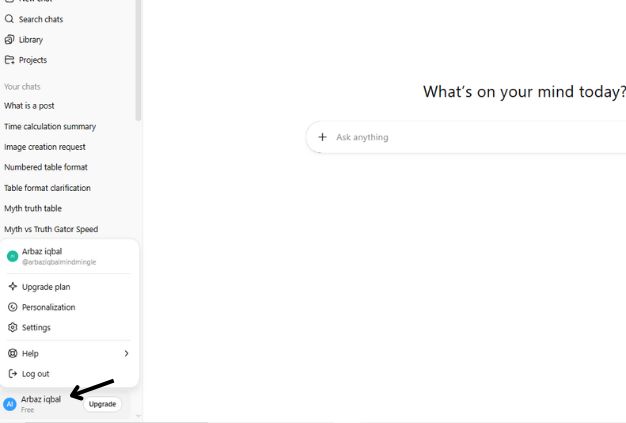
- Click on the bottom left sidebar with your profile name.
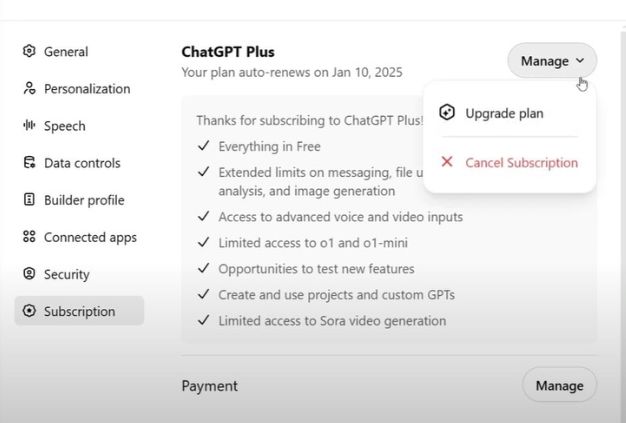
- Tap subscription choice in Settings.
- You are going to be redirected to the billing page.
- Select Cancel Plan.
- Confirm and follow through the cancellation.
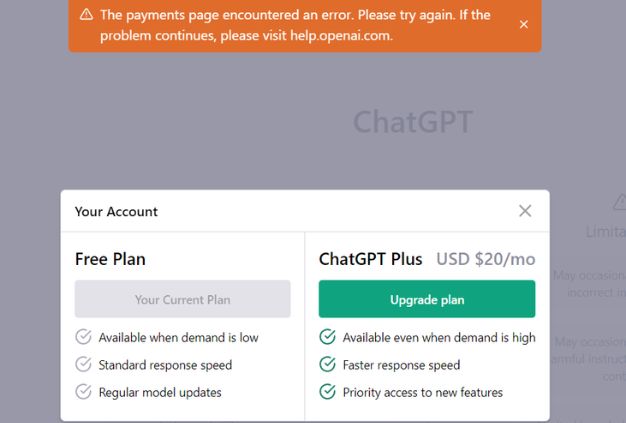
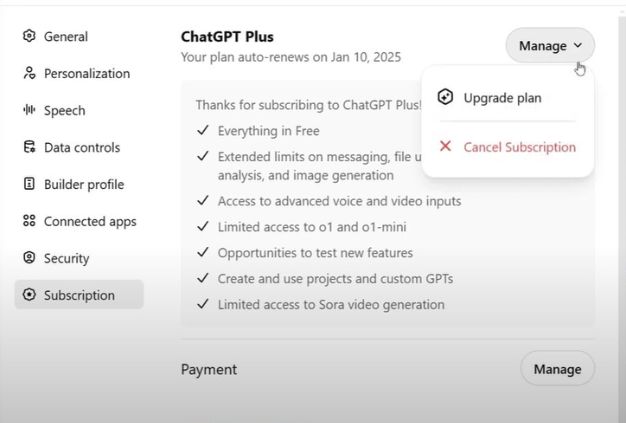
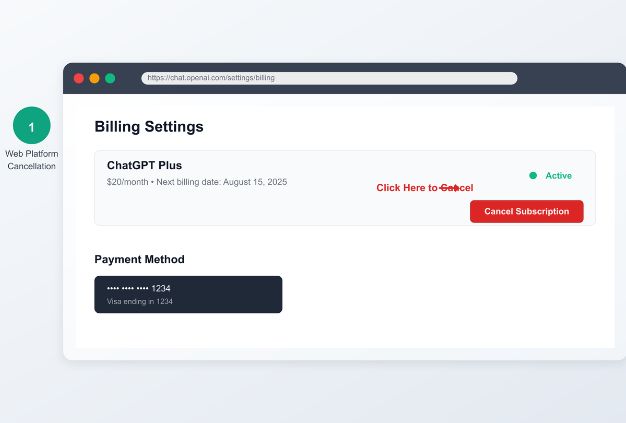
Upon doing so, ChatGPT Plus is available till your current billing period’s expiry. After that, your plan will automatically convert to its free version. It is important to always follow up your email regarding the cancellation.
Cancel ChatGPT subscription on iPhone (iOS).
In case you subscribed via the iOS application, Apple will handle all billing thus OpenAI cannot cancel your plan on their behalf. It implies that you have to use your Apple ID preferences to control or cancel your subscription.
Here’s how to cancel:
- iPhone/iPad Open Settings.
- Press the box that has your Apple ID name written on the top.
- Select Subscriptions.
- Find ChatGPT on your list of activities.
- Cancel Subscription and affirm.
Apple turns off further renewals and you get a confirmation e-mail. Similar to other platforms, your Plus access will remain active until the close of this billing period.
How to Cancel ChatGPT subscription on Android.
In the case of Android, billing is also done by Google users who subscribe via the Google Play. It means, cancellation should occur in your account in Play Store.
Steps to be followed:
- Open the Google Play Store.
- Select profile picture on the right-hand side.
- Click on Payments, and subscriptions, to Subscriptions.
- Select ChatGPT.
- Tap Cancel Subscription and go through the steps.
Upon cancellation, Google writes you a message of confirmation of the change. ChatGPT Plus will continue on a billing cycle until you reach the end of your free plan, then you are placed back on the free plan.
Suggestions regarding cancellation.
Whichever place you subscribed, a couple of things are important to follow:
- You retain all the benefits of ChatGPT Plus until your billing period.
- Always unsubscribe to the platform you subscribed to.
- Retain the confirmation email to act as evidence of cancelation.
- Check your plan status again to confirm that it is free.
These steps will help avoid confusion and guarantee that you will not be charged with something unexpected in the next months.
Billing Platforms Comparison.
| Platform | Where to Cancel | Refund Policy | When Access Ends |
| OpenAI (Web) | chat.openai.com to Settings to Manage Subscription | No refund after usage | End of billing period |
| Apple App Store | iOS Settings to Apple ID to Subscriptions | Apple decides refunds | End of billing cycle |
| Google Play Store | Play Store to Subscriptions to ChatGPT | Google policy applies | End of billing cycle |
Refund Policy
Refunds are not guaranteed and only on few cases you cancel ChatGPT subscription. Here’s how it works:
- After running your Plus benefits, at the current period, OpenAI does not provide refund.
- The EU, UK and Turkiye customers are entitled to fourteen days to claim a refund because of the regional legislation.
- Refund can be offered in cases of billing and incorrect charge.
- Apple and Google have their refund policies, which do not rely on OpenAI.
In case you qualify, visit the OpenAI Help Center and reach out to support using your account details and billing information.
Related Post – What Is ChatGPT
Mitigation For Common Issues
Subscribing to ChatGPT can be cancelled, but, in fact, users have problems with it. In case of any of these issues, Users need to check these first:
- Problems with logins: Use forgot password in chat.openai.com.
- No confirmation email: Check the site of cancellation again; in case of necessity, contact customer service with a date and transaction ID of the purchase.
Most user issues can be solved by these fast checks without the need to have lengthy support chats.
Managing Subscription Proactively.
After the ChatGPT subscription is canceled, ensure that your account shows the Free plan by clicking under Settings. The reminder that would be set on the day of your renewal will assist you to get to know whether to re-activate or be on the free version or not. Reactivation is immediate, so there are no fines or delays in setting up upgrades.
Suggestions Before Cancelling ChatGPT Subscription.
The following are some of the useful tips to check prior to cancelling:
- Google Play has the option of pausing subscription, whereas OpenAI and Apple do not.
- Chat history is saved, however, save significant chats manually.
- The free version can be sufficient in case of a simple work.
- Compare AI tools and switch before experimenting in case of experimentation.
The steps will facilitate the process of transition and avert unpleasant surprises in the future.
Final Thought
The cancellation process associated with ChatGPT seems fairly simple and easy. Despite collecting the financial information of the user at the beginning, the cancellation process has been kept fairly simple and trustworthy.
FAQs
Q1. Would I be able to cancel my subscription to ChatGPT?
Ans: Yes. The plan is cancelable at any time and when your current billing period is complete, the cycle is over.
Q2. Will I lose my chat history on cancelling?
Ans: No. It is also saved in your messages even after downgrading.
Q3. Is it possible to stop rather than cancel?
Ans: OpenAI and Apple do not have the feature of pausing like Google Play.
Q4. Is it possible to get a refund after cancellation?
Ans: In certain areas, refunds can be done on the basis of duplication or legal demands.
Q5. What is ChatGPT Plus vs. ChatGPT Pro?
Ans: In addition, Plus provides GPT-4 and increased response speed. Pro will target heavier users with more limits and other performance benefits.