Google has officially rolled out a new Search Console Insights report, bringing a more simplified and integrated way for content creators, publishers, and website owners to understand their site’s performance in Google Search.
This updated report is now fully part of the main Search Console dashboard. If you’ve used the previous standalone version of Insights, you’ll notice that it’s no longer separate — it’s built right into Search Console itself.
What’s New in the Search Console Insights Report?
The new report is designed to give you a clear, simple snapshot of your site’s search performance. You no longer have to jump between Search Console and Google Analytics to understand how users find your content.
Here’s what you get in the new report:
- Performance Overview
See your total clicks and impressions directly from Google Search. You’ll know whether those numbers are going up or down compared to the previous period. - Top-Performing Pages
Instantly spot which pages on your website are driving the most traffic. You’ll also see which ones are trending upwards or slipping. - Top Search Queries
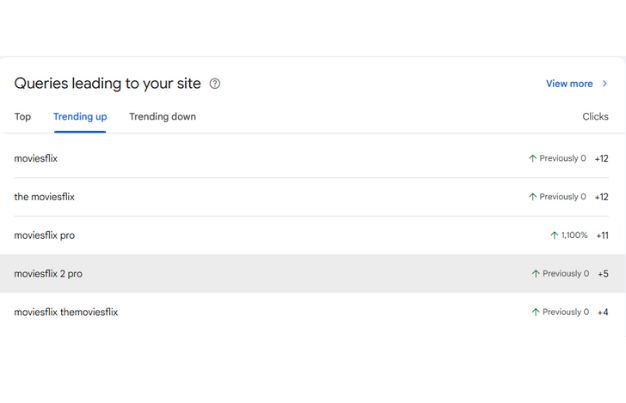
Find out what people are searching for when they land on your website. This feature gives you the keywords driving traffic and highlights rising or falling search terms. - Achievements & Milestones
A new addition that shows when your site or a page reaches certain milestones, like crossing a number of total clicks. You’ll get notified via email and inside Search Console.
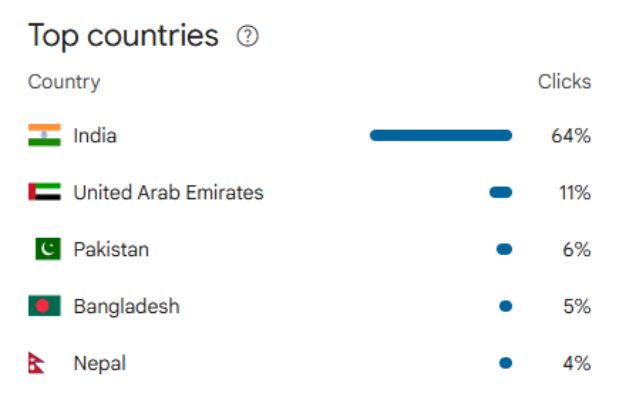
With this update, the Insights report focuses exclusively on search-driven data, reducing clutter, improving clarity, and helping you stay focused on what impacts your visibility in Google Search.
Goodbye Google Analytics Integration
In a big shift, the Search Console Insight report now works exclusively with Search Console data. Google has removed the Google Analytics integration entirely.
This means:
- No more post-click user behavior data like bounce rate or average time on page.
- The focus is now purely on how your content performs in Google Search.
Google says this change is about keeping the report simple, focused, and centered around search performance alone — without mixing in data from other channels.
Why This Change?
Google confirms that this decision was driven by:
- A focus on privacy-first design.
- Simplifying reporting to highlight what matters in search performance.
- Reducing confusion for users switching between Search Console metrics and Analytics metrics, which often didn’t align due to differences in tracking methods.
You can still access user behavior, session-level data, and multi-channel traffic in Google Analytics (GA4) separately. But the Search Console Insights report is now fully optimized for search-specific insights only.
How to Access the New Report
It’s simple:
Step 1: Log into your Google Search Console account.
Step 2: Look for the “Insights” tab in the left-hand menu.
Step 3: Click it, and your performance data is ready to go.
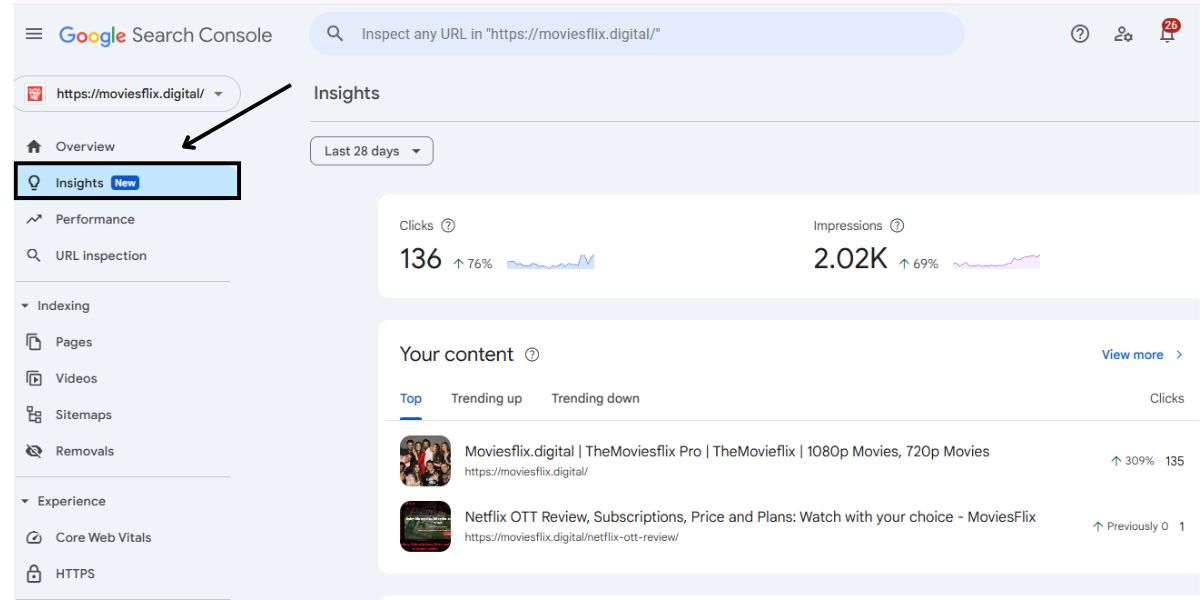
If you don’t see it yet, don’t panic. Google has confirmed that this update is being rolled out gradually worldwide. You should have it soon.
Why This Update Is a Game-Changer for Website Owners
This isn’t just a surface-level refresh; it fundamentally changes how you track and understand your website’s content performance. Whether you manage a blog, run an eCommerce store, or operate a business website, the Search Console Insight report now gives you:
- Quick answers to: Which pages are bringing in the most traffic?
- Clear visibility into: What users are typing in Google before they visit your site.
- Accurate tracking of: Whether your SEO efforts are moving in the right direction.
Quick Facts About This Update
- The older standalone Insights page is deprecated and redirects users to the new integrated version within Search Console.
- Privacy-forward: With Google moving towards a cookieless and privacy-first ecosystem, relying purely on Search Console data avoids cross-tool tracking concerns.
- No effect on main Search Console: All your standard reports like Coverage, Page Experience, and Core Web Vitals remain unchanged. This update applies only to the Insights section.
- Combining with Analytics: While Insights no longer includes GA data, you can still combine insights manually by using both GA4 and Search Console side by side for a more comprehensive view.
Wrapping Up
The updated Search Console Insights report brings a cleaner, more focused way to measure how your website performs in Google Search. With the removal of Google Analytics data, this report zeroes in on what matters, helping you understand what’s driving your organic traffic.
If you care about improving SEO, creating better content, and staying on top of search trends, this tool is now more useful than ever. Check your Search Console today your new Insights might already be waiting.