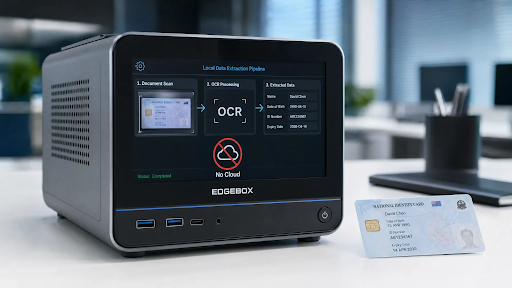
Automating the extraction of data from identity documents has become a standard requirement for a wide range of business processes, from financial onboarding and healthcare registration to access control and age verification. Cloud-based OCR APIs make this capability easy to access, but they come with a trade-off that a growing number of organizations can no longer accept: every document image sent to a cloud service leaves the organization’s infrastructure and is processed on hardware operated by a third party. For documents containing biometric data, national identity numbers, and date-of-birth information, this transfer creates data protection exposure that privacy regulations and institutional security policies may prohibit.
The alternative is local data extraction: deploying the OCR and document parsing pipeline within the organization’s own environment so that document images are processed where they are captured and never transmitted externally. Solutions OCR Studio are built specifically for this deployment model, providing document recognition SDKs that run entirely on-device or on-premise, with no outbound data transfer required at any stage of the extraction process.
What Is Local ID Data Extraction?
Local ID data extraction is the automated reading of identity document fields, including name, date of birth, document number, nationality, and expiry date, using OCR and document parsing software that executes entirely on the device or server where the document image was captured. In other words, the inference pipeline runs locally, the extracted data is returned to the calling application, and the original document image is discarded or stored locally without ever being transmitted to an external service.
A complete local extraction pipeline typically includes the following stages, all running on local hardware.
- Image capture and quality assessment: the camera captures the document image and the system evaluates sharpness, framing, glare, and minimum resolution before accepting it for processing.
- Document detection and classification: a lightweight neural network locates the document within the frame and identifies its type, such as passport, national ID card, or driver’s license, and issuing country.
- OCR and field extraction: optical character recognition reads the visible text fields of the document, mapping the detected text to the known field positions for the identified document type.
- MRZ parsing: for passports and many ID cards, the Machine Readable Zone, which is the internationally standardized two-line encoded strip on the data page, is parsed to extract validated, checksummed versions of the key data fields.
- Structured output generation: the extracted fields are assembled into a structured data object, such as a JSON record, that the calling application can consume directly.
What is also important here is that none of these stages requires a network connection. All models, templates, and parsing logic are packaged with the SDK and executed locally. The network is used only to transmit the final structured data output to the organization’s own internal systems, not to process the document image itself.

Why Avoiding Cloud Transmission Matters for ID Data Extraction
The decision to process document images locally rather than through a cloud API is driven by several distinct concerns that apply in different organizational contexts. Understanding these concerns helps clarify which organizations have the strongest need for local deployment.
Privacy Regulation Compliance
GDPR in Europe, PDPA in several Asian jurisdictions, CCPA in California, and equivalent frameworks in other regions classify identity document data as sensitive personal information subject to strict handling requirements. Sending this data to a cloud service introduces a third-party data processor into the handling chain. That’s why organizations subject to these regulations need to verify that their cloud provider’s data processing agreement satisfies the applicable requirements, and many find that the compliance documentation burden alone makes local processing the simpler path.
Institutional Security Policy
Financial institutions, healthcare providers, government agencies, and defense contractors operate under security policies that prohibit or restrict the transmission of certain categories of data outside controlled infrastructure. For these organizations, local extraction is not a preference but a compliance requirement. Given this, the evaluation question is not whether to process locally but which local extraction solution best meets their technical requirements.
Operational Independence
Cloud API dependencies introduce operational risk: if the API provider experiences an outage, changes pricing, or discontinues the service, the dependent system fails or requires emergency re-engineering. Local extraction eliminates this dependency. The extraction capability is packaged with the application and continues to function regardless of the status of any external service.
Cost at Scale
Cloud OCR APIs typically charge per document processed. At low volumes this cost is manageable, but organizations processing hundreds of thousands of documents per month find that the per-call cost becomes a significant budget line. From a financial perspective, local extraction has a fixed infrastructure cost that does not scale with transaction volume, which makes it significantly cheaper than cloud APIs beyond a relatively modest volume threshold.
Where Local ID Data Extraction Makes the Most Sense
Local extraction is not universally superior to cloud processing. It requires upfront integration effort and ongoing SDK maintenance. The following scenarios represent the contexts where this investment is most clearly justified.
Mobile KYC and Onboarding Applications
Mobile apps that capture identity documents during customer onboarding can perform the entire extraction locally on the device before submitting only the structured data record to the backend. This approach means that a passport image captured on a user’s smartphone is never transmitted anywhere. The backend receives a structured JSON record with the extracted fields, not a document photograph. Here is when on-device extraction enters the game as both a privacy and a performance improvement: local inference is faster than a cloud API round trip on a good network connection and continues to work on a poor one.
Fixed Verification Terminals
Inspection terminals at borders, bank branches, hotel front desks, and access control points can run document extraction entirely within the terminal’s local processing unit. The extracted data is passed to the organization’s internal verification system over a secure internal network, with the document image retained locally or discarded immediately after extraction. This positively affects both the data protection posture of the deployment and its operational resilience.
Healthcare Registration Systems
Patient identity documents captured at registration contain health-adjacent personal data that is subject to the highest tier of protection in a majority of jurisdictions. Local extraction ensures that patient identity images are never transmitted to a commercial cloud service, which reduces the data protection surface associated with the registration process and simplifies the data processing documentation required by healthcare privacy regulations.
What a Reliable Local ID Extraction SDK Should Have
Organizations evaluating SDKs for local document data extraction should look for the following capabilities to ensure a production-ready implementation.
- Confirmed no-network extraction pipeline. The SDK documentation should explicitly confirm that no part of the extraction process requires an outbound network connection. We recommend verifying this technically by monitoring network traffic during extraction, not relying solely on vendor documentation.
- Broad document library with offline updates. The SDK should support identity documents from all countries relevant to the deployment, with a documented process for receiving document library updates without requiring the device or server to connect to an external update service. Pay attention to the update delivery mechanism and its compatibility with the deployment’s network isolation requirements.
- MRZ parsing as a standard feature. MRZ parsing produces more reliable extracted data than visual field OCR alone because MRZ fields include built-in checksums that validate data integrity. The most highly demanded options are SDKs that prioritize MRZ reading and use visual field OCR as a fallback for documents without a standard MRZ.
- Structured output in a standard format. Extracted fields should be returned as a structured JSON or equivalent object with consistent field names across document types. Typical integrations include onboarding backends, KYC systems, access control databases, and healthcare EMR platforms, all of which benefit from a consistent data schema.
- Cross-platform deployment support. The SDK should be available for the platforms the organization needs: iOS, Android, Windows, Linux, and optionally embedded Linux for kiosk deployments. You should attentively analyze whether server-side and device-side deployment are both supported if the architecture requires both.
- Image handling and disposal controls. The SDK should provide controls over whether document images are retained after extraction and for how long, supporting the data minimization requirements of applicable privacy regulations.
How to Implement Local ID Data Extraction in a Production System
The following steps outline a practical implementation path for development teams adding local document extraction to an existing or new application.
- Select the SDK and verify the no-network claim empirically. Before committing to an SDK, install it in a test environment with outbound network access blocked and confirm that extraction completes successfully. This single test eliminates a large category of integration surprises and confirms the vendor’s claim under controlled conditions.
- Integrate document capture with real-time quality feedback. The extraction quality depends heavily on image quality at capture. The capture interface should provide real-time guidance to the user or operator to ensure the document is well-framed, in focus, and free from significant glare before the image is submitted for extraction. Extraction failures caused by poor image quality are the most common production issue in local document scanning deployments.
- Map the extracted fields to the downstream data schema. Different SDKs use different field naming conventions. It will be helpful to create an explicit mapping layer that translates the SDK’s output schema to the field names expected by the backend system, rather than relying on the SDK’s native field names throughout the codebase. This mapping layer also simplifies future SDK upgrades.
- Implement image disposal according to the retention policy. Define whether extracted document images should be discarded immediately after extraction, retained for a defined period for audit purposes, or stored in encrypted local storage. Implement this logic in the application layer, not by relying on the SDK’s default behavior, to ensure the retention policy is applied consistently.
- Test extraction accuracy on the document types used in the deployment population. Published accuracy benchmarks are averages across broad document sets. It will be helpful to test the SDK specifically on a representative sample of the documents the deployment will encounter, including older document versions, documents with physical wear, and documents from countries at the edge of the supported library. Edge case performance is more relevant to production reliability than average benchmark performance.
Automating ID data extraction without cloud transmission is a well-established technical capability that is available through purpose-built on-device and on-premise SDKs. The extraction pipeline, from image capture through MRZ parsing to structured output generation, can run entirely on local hardware with accuracy comparable to cloud-based alternatives and without the data protection trade-offs that cloud transmission introduces.
Organizations that implement local extraction correctly gain operational independence from external services, a simplified data protection posture, and a cost structure that does not scale with transaction volume. The implementation requires selecting an SDK with a genuinely network-free extraction pipeline, integrating quality-controlled document capture, and establishing clear image retention policies. These mechanics boost the reliability and compliance standing of the overall system far beyond what a cloud API integration can offer in environments where data sovereignty matters.